


Maisine LED Tracing Light Pad
- See fine details with 8 brightness levels
- Choose warm, natural or white light
- Find your angle with the built-in 8-position stand
- Keep your project steady with magnetic holders
Accepted payment methods
What can I use it for?
Use the illuminated surface beneath compatible paper or a diamond-painting canvas to make outlines and printed symbols easier to see. It also suits sketch tracing, lettering practice and stencil work. It is a light source, not a digital drawing screen.
How big is the illuminated area?
The A3-format pad measures 16.5 × 12.6 × 0.47 inches overall. The illuminated working area is 14.96 × 11.42 inches, as shown in the product graphic. Larger projects can be repositioned as you work.
Can I use it without a cable?
Yes. The built-in 2500 mAh battery supports cordless use, and the pad charges through its USB-C port. Runtime varies with brightness and use. Follow the supplied instructions for charging and power requirements.
What comes with the light pad?
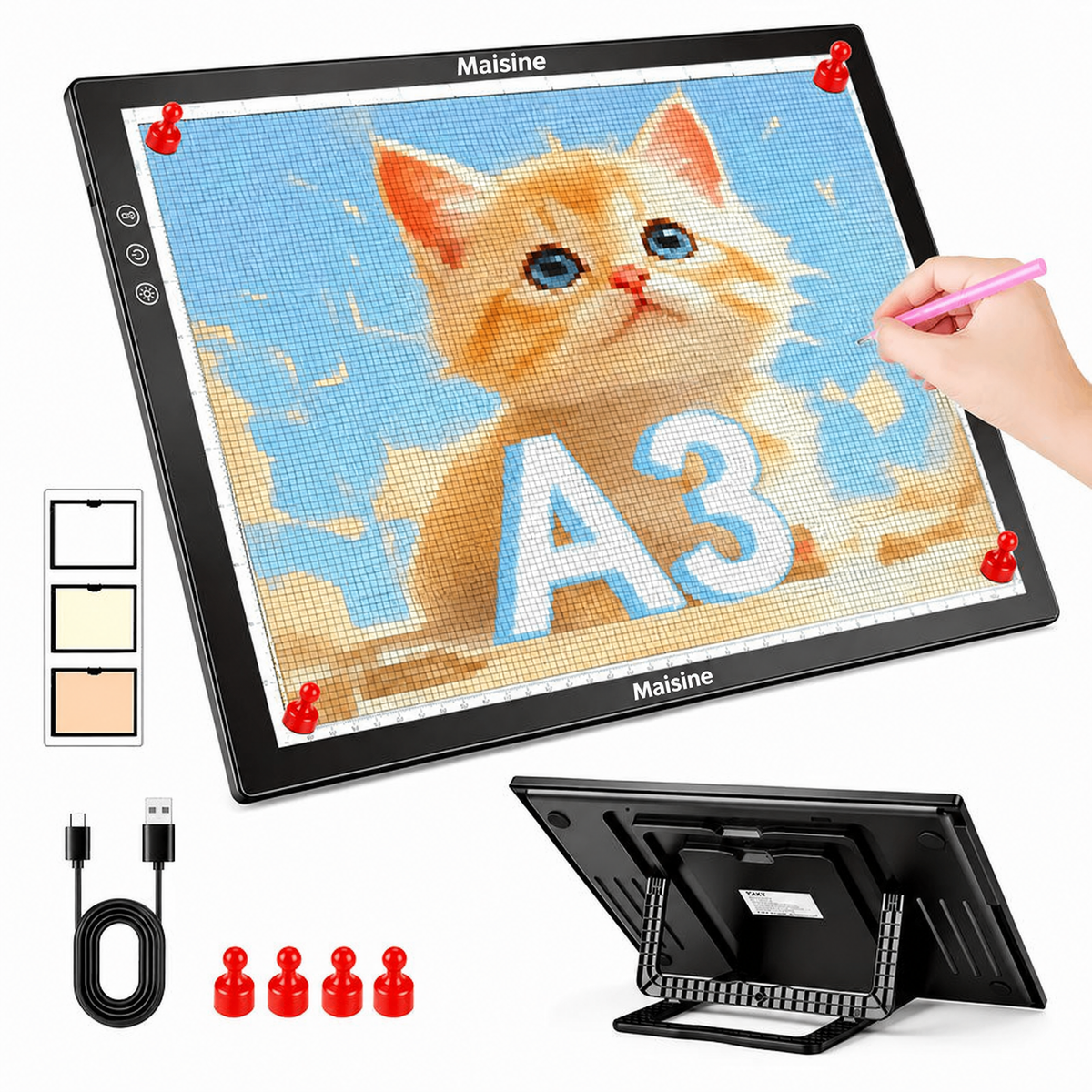
The product images show one A3 light pad with a built-in stand, a USB-C cable, four magnetic holders and a user manual. Artwork and craft supplies shown in use are for illustration; a wall power adapter is not listed among the included items.
For the details you love
See the details.
Enjoy the making.
The next diamond-painting symbol. A delicate outline. The small marks that bring your project together.
Maisine lights your work from underneath, helping those details show through compatible paper or canvas. Set it up at your craft table and settle into the part you enjoy: making.

Your project. Your light.
A little brighter.
A little warmer.
Choose from eight brightness levels and three light colors: white, natural or warm. Adjust the light to suit your material, room and preference.
Use the touch controls to find a setting that makes the marks clear. Different paper and canvas thicknesses transmit light differently, so start with your actual project.
Set up your making space
Bring your work
into view.
The built-in stand offers eight positions, so you can raise the pad from the tabletop and choose the angle that suits your seat and project.
Magnetic holders help keep your work in place. A rechargeable battery lets you work without a connected cable once charged.
Place the pad on a stable surface and follow the supplied setup instructions.


More than one way to make
One pad.
Your next idea.
- Diamond paintingBacklight compatible canvases to bring printed symbols into view.
- Drawing & letteringLayer a blank sheet over your reference and follow the lines.
- Patterns & stencilsTrace outlines onto suitable paper for your next project.
A simple start
Set it down.
Light it up.
A few adjustments bring your workspace together.
- Position your project
Set the pad on a stable surface, choose a stand position and place your paper or canvas over the illuminated area.
- Choose your lighting
Switch on the pad and select a light color and brightness level that suit your material.
- Make it yours
Secure your work with the magnetic holders, then trace or place your diamonds. Reposition larger projects as needed.
The details, laid out
Room for
your next project.
- Overall size
- 16.5 × 12.6 × 0.47 inches; A3-format pad.
- Illuminated work area
- 14.96 × 11.42 inches.
- Light controls
- 8 brightness levels; white, natural and warm light.
- Viewing angle
- Built-in stand with 8 positions.
- Power
- Built-in 2500 mAh rechargeable battery; USB-C charging.
- Included accessories
- USB-C cable, 4 magnetic holders and user manual. Craft supplies are not included.
Dimensions and battery capacity are shown in the supplied product graphics. Check the illuminated area against your project size.
Before you begin
A clearer picture.
What can I use it for?
Use the illuminated surface beneath compatible paper or a diamond-painting canvas to make outlines and printed symbols easier to see. It also suits sketch tracing, lettering practice and stencil work. It is a light source, not a digital drawing screen.
How big is the illuminated area?
The A3-format pad measures 16.5 × 12.6 × 0.47 inches overall. The illuminated working area is 14.96 × 11.42 inches, as shown in the product graphic. Larger projects can be repositioned as you work.
Can I use it without a cable?
Yes. The built-in 2500 mAh battery supports cordless use, and the pad charges through its USB-C port. Runtime varies with brightness and use. Follow the supplied instructions for charging and power requirements.
What comes with the light pad?
The product images show one A3 light pad with a built-in stand, a USB-C cable, four magnetic holders and a user manual. Artwork and craft supplies shown in use are for illustration; a wall power adapter is not listed among the included items.
Will it work through every kind of paper?
Visibility depends on material thickness, opacity, printed contrast and room lighting. Use compatible tracing paper or canvas and adjust the brightness. Opaque board and very thick materials may block the light.
Does it connect to a computer to display images?
No digital display or drawing software is specified. Place a physical reference and suitable paper on the lighted surface. The USB-C connection is for power and charging, not for displaying an image.
How should I care for it?
Switch off and disconnect the pad before cleaning. Use a soft cloth and follow the supplied manual. Do not immerse it, use it as a cutting mat or draw directly on the illuminated surface.
Make time
for your next idea.
Adjustable light, a built-in stand and a place for the details.